How to Add Size Guide Link to Shopify

Add a size chart to product pages

This page was printed on Dec 05, 2021. For the current version, visit https://help.shopify.com/en/manual/online-store/themes/os/customize/add-size-chart.

If you sell clothing items that require customers to know their size before they make a purchase, you can add a custom size chart to your product page.

All products that require reference to the size chart must have a Size option:
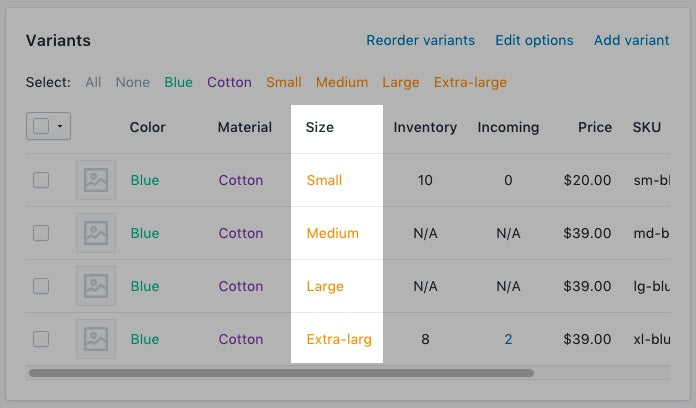
size option example

Creating a size chart page

  1. From your Shopify admin, go to Online Store > Pages.
  1. From the Shopify app, tap Store.
  2. In the Sales channels section, tap Online Store.
  3. Tap Pages.
  1. From the Shopify app, tap Store.
  2. In the Sales channels section, tap Online Store.
  3. Tap Pages.
  1. Click Add page.

  2. Enter a page title.

    • If you want to create a size chart that appears site-wide, then enter Size Chart for the page title. In the Search engine listing preview section, the URL of the page should end in /size-chart.
    • If you want to create a chart that only appears on products from a specific vendor, then enter the name of the vendor followed by Size Chart.
      For example, if your vendor is called Great Owls, then enter Great Owls Size Chart for the page title. In the Search engine listing preview section, the URL of the page should end in /great-owls-size-chart.
    • If you want to create a chart that only appears on a specific type of product, then enter the product type followed by Size Chart.
      For example, if you want to display a size chart specific to shoes, then enter Shoes Size Chart for the page title. In the Search engine listing preview section, the URL of the page should end in /shoes-size-chart.
  3. In the Content box, create a table that contains your size chart information. Customize the table to look the way you want it to:
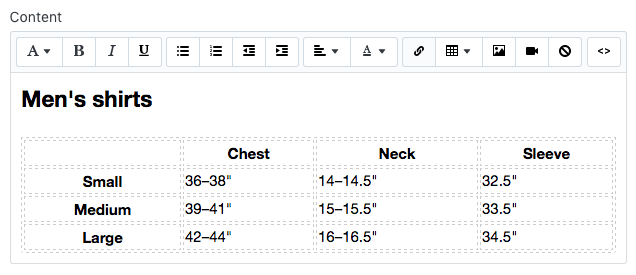
    Customizing the size chart table
  4. In the Visibility section, make sure the page is set to Visible.

  5. Click Save.

  1. From your Shopify admin, go to Online Store > Themes.

  2. Find the theme you want to edit, and then click Actions > Edit code.

  1. From the Shopify app, tap Store.

  2. In the Sales channels section, tap Online Store.

  3. Tap Manage themes.

  4. Find the theme you want to edit, and then click Actions > Edit code.

  1. From the Shopify app, tap Store.

  2. In the Sales channels section, tap Online Store.

  3. Tap Manage themes.

  4. Find the theme you want to edit, and then click Actions > Edit code.

Choose one of the following and create a size chart snippet

Creating a size chart snippet

  1. In the Snippets directory, click Add a new snippet.

  2. Name your snippet size-chart, and click Create snippet:

    size chart snippet
  3. Copy the following into your size-chart snippet:

                                      <div                    class=                    "pop-up-modal"                    >                    <div                    class=                    "pop-up-content"                    >                    <span                    class=                    "close-button"                    >                    &times;                    </span>                    <span                    class=                    "size-chart-content"                    >{{ pages.size-chart.content }}</span>                    </div>                    </div>                    <script>                    const                    modal                    =                    document                    .                    querySelector                    (                    "                    .pop-up-modal                    "                    );                    const                    trigger                    =                    document                    .                    querySelector                    (                    "                    .trigger-pop-up                    "                    );                    const                    closeButton                    =                    document                    .                    querySelector                    (                    "                    .close-button                    "                    );                    function                    toggleModal                    ()                    {                    modal                    .                    classList                    .                    toggle                    (                    "                    show-pop-up                    "                    );                    }                    function                    windowOnClick                    (                    event                    )                    {                    if                    (                    event                    .                    target                    ===                    modal                    )                    {                    toggleModal                    ();                    }                    }                    trigger                    .                    addEventListener                    (                    "                    click                    "                    ,                    toggleModal                    );                    closeButton                    .                    addEventListener                    (                    "                    click                    "                    ,                    toggleModal                    );                    window                    .                    addEventListener                    (                    "                    click                    "                    ,                    windowOnClick                    );                    </script>                    <style>                    .pop-up-modal                    {                    position                    :                    fixed                    ;                    left                    :                    0                    ;                    top                    :                    0                    ;                    width                    :                    100%                    ;                    height                    :                    100%                    ;                    background-color                    :                    rgba                    (                    0                    ,                    0                    ,                    0                    ,                    0.5                    );                    opacity                    :                    0                    ;                    display                    :                    none                    ;                    transform                    :                    scale                    (                    1.1                    );                    transition                    :                    visibility                    0s                    linear                    0.25s                    ,                    opacity                    0.25s                    0s                    ,                    transform                    0.25s                    ;                    }                    .pop-up-content                    {                    position                    :                    absolute                    ;                    top                    :                    50%                    ;                    left                    :                    50%                    ;                    transform                    :                    translate                    (                    -50%                    ,                    -50%                    );                    background-color                    :                    white                    ;                    padding                    :                    1rem                    1.5rem                    ;                    width                    :                    auto                    ;                    border-radius                    :                    0.5rem                    ;                    }                    .pop-up-content                    table                    {                    table-layout                    :                    auto                    ;                    }                    .close-button                    {                    float                    :                    right                    ;                    width                    :                    1.5rem                    ;                    line-height                    :                    1.5rem                    ;                    text-align                    :                    center                    ;                    cursor                    :                    pointer                    ;                    border-radius                    :                    0.25rem                    ;                    background-color                    :                    lightgray                    ;                    }                    .close-button                    :hover                    {                    background-color                    :                    darkgray                    ;                    }                    .show-pop-up                    {                    z-index                    :                    12                    ;                    opacity                    :                    1                    ;                    display                    :                    block                    ;                    transform                    :                    scale                    (                    1.0                    );                    transition                    :                    visibility                    0s                    linear                    0s                    ,                    opacity                    0.25s                    0s                    ,                    transform                    0.25s                    ;                    }                    .trigger-pop-up                    {                    margin                    :                    10px                    0                    10px                    0                    ;                    width                    :                    100%                    ;                    }                    @media                    only                    screen                    and                    (                    max-width                    :                    749px                    )                    {                    .pop-up-content                    ,                    .size-chart-content                    table                    {                    width                    :                    100%                    ;                    }                    .size-chart-content                    th                    ,                    .size-chart-content                    td                    {                    padding                    :                    10px                    ;                    }                    }                    </style>                                  

If you are using the theme Simple replace from .trigger-pop-up to right above </style> with this code:

                                      .trigger-pop-up                    {                    margin                    :                    10px                    0                    10px                    8px                    ;                    width                    :                    50%                    ;                    }                    @media                    only                    screen                    and                    (                    max-width                    :                    749px                    )                    {                    .pop-up-content                    ,                    .size-chart-content                    table                    {                    width                    :                    100%                    ;                    }                    .size-chart-content                    th                    ,                    .size-chart-content                    td                    {                    padding                    :                    10px                    ;                    }                    .trigger-pop-up                    {                    width                    :                    100%                    ;                    }                    }                                  

If you are using the theme Minimal add the following code above the closing </style> tag:

                                      @media                    only                    screen                    and                    (                    min-width                    :                    750px                    )                    {                    .trigger-pop-up                    {                    width                    :                    50%                    ;                    }                    }                                  

Add the size chart snippet into your theme.liquid

  1. In the Layout directory, click to open your theme.liquid file.

  2. Find the closing </body> tag. Right above the closing </body> tag, paste the following code:

                                      {%                                                            if                                                            request                    .                    page_type                                                            ==                                                            'product'                                                            %}                    {%                                                            if                                                            product                    .                    options                                                            contains                                                            'Size'                                                            %}                    {%                                                            render                                                            'size-chart'                                                            %}                    {%                                                            endif                                                            %}                    {%                                                            endif                                                            %}                                  

Add a Size chart button

  1. In the Sections directory, click to open your product-template.liquid file or product.liquid file if you do not have a product-template.liquid file.

  2. Paste the following code above the Add to cart button:

                                      {%                                                            if                                                            product                    .                    options                                                            contains                                                            'Size'                                                            %}                    <a class="trigger-pop-up btn">See Size Chart</a>                    {%                                                            endif                                                            %}                                  

The Add to cart button typically starts with something like <button type="submit" name="add". If your store's operating language is not English, then replace See Size Chart with the text that you prefer to use.

Creating a size chart snippet

  1. In the Snippets directory, click Add a new snippet.

  2. Name your snippet size-chart, and click Create snippet:

    size chart snippet
  3. Copy the following into your size-chart snippet:

                  {% assign chart = product.type | handleize | append: "-size-chart" %}     {% unless pages[chart].empty? or pages[chart].content == blank %}                    <div                    class=                    "pop-up-modal"                    >                    <div                    class=                    "pop-up-content"                    >                    <span                    class=                    "close-button"                    >                    &times;                    </span>                    <span                    class=                    "size-chart-content"                    >{{ pages[chart].content }}</span>                    </div>                    </div>                    {% endunless %}                    <script>                    const                    modal                    =                    document                    .                    querySelector                    (                    "                    .pop-up-modal                    "                    );                    const                    trigger                    =                    document                    .                    querySelector                    (                    "                    .trigger-pop-up                    "                    );                    const                    closeButton                    =                    document                    .                    querySelector                    (                    "                    .close-button                    "                    );                    function                    toggleModal                    ()                    {                    modal                    .                    classList                    .                    toggle                    (                    "                    show-pop-up                    "                    );                    }                    function                    windowOnClick                    (                    event                    )                    {                    if                    (                    event                    .                    target                    ===                    modal                    )                    {                    toggleModal                    ();                    }                    }                    trigger                    .                    addEventListener                    (                    "                    click                    "                    ,                    toggleModal                    );                    closeButton                    .                    addEventListener                    (                    "                    click                    "                    ,                    toggleModal                    );                    window                    .                    addEventListener                    (                    "                    click                    "                    ,                    windowOnClick                    );                    </script>                    <style>                    .pop-up-modal                    {                    position                    :                    fixed                    ;                    left                    :                    0                    ;                    top                    :                    0                    ;                    width                    :                    100%                    ;                    height                    :                    100%                    ;                    background-color                    :                    rgba                    (                    0                    ,                    0                    ,                    0                    ,                    0.5                    );                    opacity                    :                    0                    ;                    display                    :                    none                    ;                    transform                    :                    scale                    (                    1.1                    );                    transition                    :                    visibility                    0s                    linear                    0.25s                    ,                    opacity                    0.25s                    0s                    ,                    transform                    0.25s                    ;                    }                    .pop-up-content                    {                    position                    :                    absolute                    ;                    top                    :                    50%                    ;                    left                    :                    50%                    ;                    transform                    :                    translate                    (                    -50%                    ,                    -50%                    );                    background-color                    :                    white                    ;                    padding                    :                    1rem                    1.5rem                    ;                    width                    :                    auto                    ;                    border-radius                    :                    0.5rem                    ;                    }                    .pop-up-content                    table                    {                    table-layout                    :                    auto                    ;                    }                    .close-button                    {                    float                    :                    right                    ;                    width                    :                    1.5rem                    ;                    line-height                    :                    1.5rem                    ;                    text-align                    :                    center                    ;                    cursor                    :                    pointer                    ;                    border-radius                    :                    0.25rem                    ;                    background-color                    :                    lightgray                    ;                    }                    .close-button                    :hover                    {                    background-color                    :                    darkgray                    ;                    }                    .show-pop-up                    {                    z-index                    :                    12                    ;                    opacity                    :                    1                    ;                    display                    :                    block                    ;                    transform                    :                    scale                    (                    1.0                    );                    transition                    :                    visibility                    0s                    linear                    0s                    ,                    opacity                    0.25s                    0s                    ,                    transform                    0.25s                    ;                    }                    .trigger-pop-up                    {                    margin                    :                    10px                    0                    10px                    0                    ;                    width                    :                    100%                    ;                    }                    @media                    only                    screen                    and                    (                    max-width                    :                    749px                    )                    {                    .pop-up-content                    ,                    .size-chart-content                    table                    {                    width                    :                    100%                    ;                    }                    .size-chart-content                    th                    ,                    .size-chart-content                    td                    {                    padding                    :                    10px                    ;                    }                    }                    </style>                                  

If you are using the theme Simple replace from .trigger-pop-up to right above </style> with this code:

                                      .trigger-pop-up                    {                    margin                    :                    10px                    0                    10px                    8px                    ;                    width                    :                    50%                    ;                    }                    @media                    only                    screen                    and                    (                    max-width                    :                    749px                    )                    {                    .pop-up-content                    ,                    .size-chart-content                    table                    {                    width                    :                    100%                    ;                    }                    .size-chart-content                    th                    ,                    .size-chart-content                    td                    {                    padding                    :                    10px                    ;                    }                    .trigger-pop-up                    {                    width                    :                    100%                    ;                    }                    }                                  

If you are using the theme Minimal add the following code above the closing </style> tag:

                                      @media                    only                    screen                    and                    (                    min-width                    :                    750px                    )                    {                    .trigger-pop-up                    {                    width                    :                    50%                    ;                    }                    }                                  

Add the size chart snippet into your theme.liquid

  1. In the Layout directory, click to open your theme.liquid file.

  2. Find the closing </body> tag. Right above the closing </body> tag, paste the following code:

                                      {%                                                            if                                                            request                    .                    page_type                                                            ==                                                            'product'                                                            %}                    {%                                                            if                                                            product                    .                    options                                                            contains                                                            'Size'                                                            %}                    {%                                                            assign                                                            chart                                                            =                                                            product                    .                    type                                                            |                                                            handleize                                                            |                                                            append                    :                                                            "-size-chart"                                                            %}                    {%                                                            unless                                                            pages                    [                    chart                    ].                    empty                    ?                                                            or                                                            pages                    [                    chart                    ].                    content                                                            ==                                                            blank                                                            %}                    {%                                                            render                                                            'size-chart'                                                            %}                    {%                                                            endunless                                                            %}                    {%                                                            endif                                                            %}                    {%                                                            endif                                                            %}                                  

Add a Size chart button

  1. In the Sections directory, click to open your product-template.liquid file or product.liquid file if you do not have a product-template.liquid file.

  2. Paste the following code above the Add to cart button:

                                      {%                                                            if                                                            product                    .                    options                                                            contains                                                            'Size'                                                            %}                    {%                                                            assign                                                            chart                                                            =                                                            product                    .                    type                                                            |                                                            handleize                                                            |                                                            append                    :                                                            "-size-chart"                                                            %}                    {%                                                            unless                                                            pages                    [                    chart                    ].                    empty                    ?                                                            or                                                            pages                    [                    chart                    ].                    content                                                            ==                                                            blank                                                            %}                    <a class="trigger-pop-up btn">See Size Chart</a>                    {%                                                            endunless                                                            %}                    {%                                                            endif                                                            %}                                  

The Add to cart button typically starts with something like <button type="submit" name="add". If your store's operating language is not English, then replace See Size Chart with the text that you prefer to use.

Creating a size chart snippet

  1. In the Snippets directory, click Add a new snippet.

  2. Name your snippet size-chart, and click Create snippet:

    size chart snippet
  3. Copy the following into your size-chart snippet:

                  {% assign chart = product.vendor | handleize | append: "-size-chart" %}     {% unless pages[chart].empty? or pages[chart].content == blank %}                    <div                    class=                    "pop-up-modal"                    >                    <div                    class=                    "pop-up-content"                    >                    <span                    class=                    "close-button"                    >                    &times;                    </span>                    <span                    class=                    "size-chart-content"                    >{{ pages[chart].content }}</span>                    </div>                    </div>                    {% endunless %}                    <script>                    const                    modal                    =                    document                    .                    querySelector                    (                    "                    .pop-up-modal                    "                    );                    const                    trigger                    =                    document                    .                    querySelector                    (                    "                    .trigger-pop-up                    "                    );                    const                    closeButton                    =                    document                    .                    querySelector                    (                    "                    .close-button                    "                    );                    function                    toggleModal                    ()                    {                    modal                    .                    classList                    .                    toggle                    (                    "                    show-pop-up                    "                    );                    }                    function                    windowOnClick                    (                    event                    )                    {                    if                    (                    event                    .                    target                    ===                    modal                    )                    {                    toggleModal                    ();                    }                    }                    trigger                    .                    addEventListener                    (                    "                    click                    "                    ,                    toggleModal                    );                    closeButton                    .                    addEventListener                    (                    "                    click                    "                    ,                    toggleModal                    );                    window                    .                    addEventListener                    (                    "                    click                    "                    ,                    windowOnClick                    );                    </script>                    <style>                    .pop-up-modal                    {                    position                    :                    fixed                    ;                    left                    :                    0                    ;                    top                    :                    0                    ;                    width                    :                    100%                    ;                    height                    :                    100%                    ;                    background-color                    :                    rgba                    (                    0                    ,                    0                    ,                    0                    ,                    0.5                    );                    opacity                    :                    0                    ;                    display                    :                    none                    ;                    transform                    :                    scale                    (                    1.1                    );                    transition                    :                    visibility                    0s                    linear                    0.25s                    ,                    opacity                    0.25s                    0s                    ,                    transform                    0.25s                    ;                    }                    .pop-up-content                    {                    position                    :                    absolute                    ;                    top                    :                    50%                    ;                    left                    :                    50%                    ;                    transform                    :                    translate                    (                    -50%                    ,                    -50%                    );                    background-color                    :                    white                    ;                    padding                    :                    1rem                    1.5rem                    ;                    width                    :                    auto                    ;                    border-radius                    :                    0.5rem                    ;                    }                    .pop-up-content                    table                    {                    table-layout                    :                    auto                    ;                    }                    .close-button                    {                    float                    :                    right                    ;                    width                    :                    1.5rem                    ;                    line-height                    :                    1.5rem                    ;                    text-align                    :                    center                    ;                    cursor                    :                    pointer                    ;                    border-radius                    :                    0.25rem                    ;                    background-color                    :                    lightgray                    ;                    }                    .close-button                    :hover                    {                    background-color                    :                    darkgray                    ;                    }                    .show-pop-up                    {                    z-index                    :                    12                    ;                    opacity                    :                    1                    ;                    display                    :                    block                    ;                    transform                    :                    scale                    (                    1.0                    );                    transition                    :                    visibility                    0s                    linear                    0s                    ,                    opacity                    0.25s                    0s                    ,                    transform                    0.25s                    ;                    }                    .trigger-pop-up                    {                    margin                    :                    10px                    0                    10px                    0                    ;                    width                    :                    100%                    ;                    }                    @media                    only                    screen                    and                    (                    max-width                    :                    749px                    )                    {                    .pop-up-content                    ,                    .size-chart-content                    table                    {                    width                    :                    100%                    ;                    }                    .size-chart-content                    th                    ,                    .size-chart-content                    td                    {                    padding                    :                    10px                    ;                    }                    }                    </style>                                  

If you are using the theme Simple replace from .trigger-pop-up to right above </style> with this code:

                                      .trigger-pop-up                    {                    margin                    :                    10px                    0                    10px                    8px                    ;                    width                    :                    50%                    ;                    }                    @media                    only                    screen                    and                    (                    max-width                    :                    749px                    )                    {                    .pop-up-content                    ,                    .size-chart-content                    table                    {                    width                    :                    100%                    ;                    }                    .size-chart-content                    th                    ,                    .size-chart-content                    td                    {                    padding                    :                    10px                    ;                    }                    .trigger-pop-up                    {                    width                    :                    100%                    ;                    }                    }                                  

If you are using the theme Minimal add the following code above the closing </style> tag:

                                      @media                    only                    screen                    and                    (                    min-width                    :                    750px                    )                    {                    .trigger-pop-up                    {                    width                    :                    50%                    ;                    }                    }                                  

Add the size chart snippet into your theme.liquid

  1. In the Layout directory, click to open your theme.liquid file.

  2. Find the closing </body> tag. Right above the closing </body> tag, paste the following code:

                                      {%                                                            if                                                            request                    .                    page_type                                                            ==                                                            'product'                                                            %}                    {%                                                            if                                                            product                    .                    options                                                            contains                                                            'Size'                                                            %}                    {%                                                            assign                                                            chart                                                            =                                                            product                    .                    vendor                                                            |                                                            handleize                                                            |                                                            append                    :                                                            "-size-chart"                                                            %}                    {%                                                            unless                                                            pages                    [                    chart                    ].                    empty                    ?                                                            or                                                            pages                    [                    chart                    ].                    content                                                            ==                                                            blank                                                            %}                    {%                                                            render                                                            'size-chart'                                                            %}                    {%                                                            endunless                                                            %}                    {%                                                            endif                                                            %}                    {%                                                            endif                                                            %}                                  

Add a Size chart button

  1. In the Sections directory, click to open your product-template.liquid file or product.liquid file if you do not have a product-template.liquid file.

  2. Paste the following code above the Add to cart button:

                                      {%                                                            if                                                            product                    .                    options                                                            contains                                                            'Size'                                                            %}                    {%                                                            assign                                                            chart                                                            =                                                            product                    .                    vendor                                                            |                                                            handleize                                                            |                                                            append                    :                                                            "-size-chart"                                                            %}                    {%                                                            unless                                                            pages                    [                    chart                    ].                    empty                    ?                                                            or                                                            pages                    [                    chart                    ].                    content                                                            ==                                                            blank                                                            %}                    <a class="trigger-pop-up btn">See Size Chart</a>                    {%                                                            endunless                                                            %}                    {%                                                            endif                                                            %}                                  

The Add to cart button typically starts with something like <button type="submit" name="add". If your store's operating language is not English, then replace See Size Chart with the text that you prefer to use.

How to Add Size Guide Link to Shopify

Source: https://help.shopify.com/en/manual/online-store/themes/os/customize/add-size-chart

0 Response to "How to Add Size Guide Link to Shopify"

Post a Comment

Iklan Atas Artikel

Iklan Tengah Artikel 1

Iklan Tengah Artikel 2

Iklan Bawah Artikel